

Turn your data into insight. Let's start with a 40-hour Tableau proof-of-concept for $2,500. Send your brief →

I spent time exploring Chroma to understand what it actually does beyond the technical buzzwords. Chroma is an open-source search and retrieval infrastructure designed specifically for AI applications. At its core, it functions as a vector database that allows you to store embeddings, run semantic search, and combine it with full-text, regex, and metadata filtering inside a single system.
What immediately stands out is that it is not just a database in the traditional sense. It is positioned as an AI-native retrieval layer for applications like RAG pipelines, semantic search engines, and AI agents. Instead of thinking in rows and columns, you are working with embeddings, similarity search, and retrieval strategies. That shift becomes obvious once you start interacting with it.
The interesting part is how it tries to unify multiple retrieval methods in one place, meaning you are not limited to pure vector search. It blends lexical search, sparse search, and metadata filtering into a single query interface, which is important for real-world AI systems where pure semantic search is often not enough.

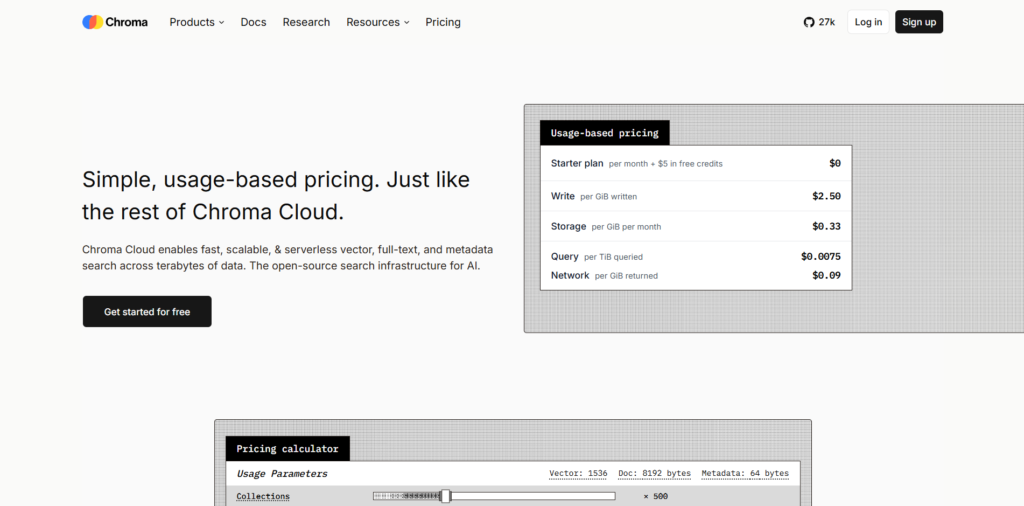
When I first opened the Chroma website, the messaging was very direct. It immediately positions itself as “open-source search infrastructure for AI” and emphasizes speed, scalability, and serverless architecture.
The design is developer-focused rather than product-demo focused. There is less storytelling and more technical confidence. It feels like a tool built for engineers who already understand what vector databases are rather than beginners trying to learn from scratch.
What stands out immediately is the emphasis on scale and performance. It highlights handling billions of vectors, low latency queries, and multi-tenant indexing. The tone is very infrastructure-heavy, not consumer-friendly, which matches the target audience.
You can explore Chroma here.
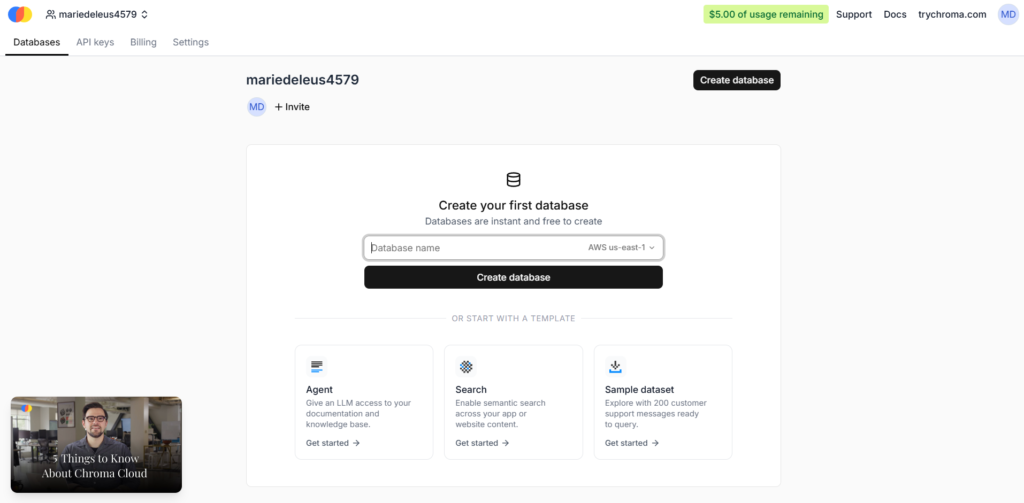
The onboarding experience is not a traditional SaaS signup flow. Instead of a guided product onboarding, Chroma pushes you toward documentation, SDK installation, or cloud setup.
You either install it locally or spin up a cloud instance. The entry point is code-first, not UI-first. This means your “signup experience” is essentially choosing your deployment path.
There is minimal friction if you are a developer. Installing via pip or npm is straightforward, and you can start creating collections almost immediately. The time to first value is very fast if you are comfortable in a terminal environment.
However, for non-technical users, there is no real onboarding abstraction layer. You are expected to understand embeddings and retrieval concepts beforehand.

Once inside Chroma Cloud or a local instance, the “dashboard” is not a traditional analytics UI. It is more of a functional control plane for collections, queries, and data ingestion.
The interface is minimal and heavily API-driven. Most interactions happen through SDK calls rather than clicking through a visual dashboard. You create collections, add embeddings, and query them programmatically.
The clarity comes from structure rather than visual UI polish. Everything is organized around collections and queries, which makes sense from a database perspective but feels less like a product dashboard and more like a developer console.
For experienced engineers, this simplicity is a strength. For product-style users, it can feel abstract.
One of the core features is vector search. This allows you to store embeddings and query them based on semantic similarity rather than keyword matching. This is the foundation of most RAG systems and AI search applications.
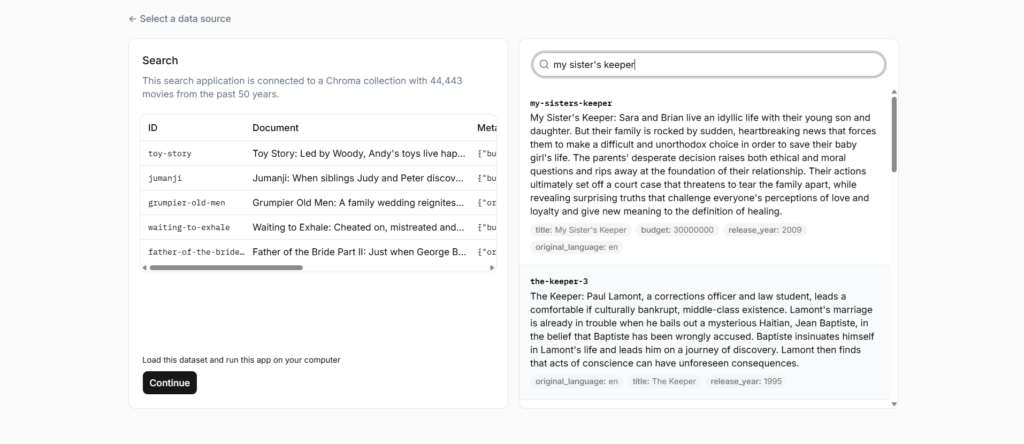
Another important feature is hybrid search. Chroma allows you to combine dense vector search with sparse search (like BM25 or SPLADE) and full-text matching. This makes retrieval more accurate because it can balance semantic meaning with exact keyword matches.
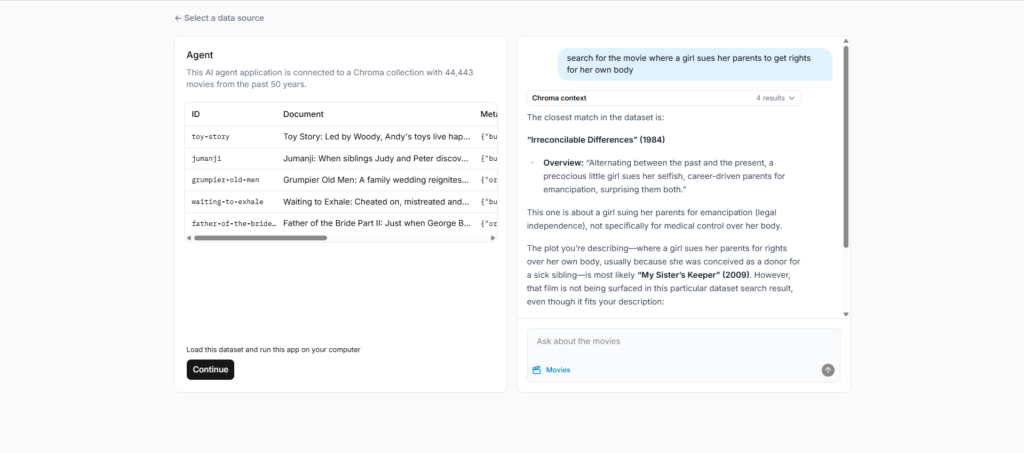
A third key feature is metadata filtering. You can attach structured metadata to documents and filter search results based on conditions at query time. This is critical for real-world use cases like filtering by user, category, or timestamp.
What stands out in practice is how flexible the retrieval layer is. You are not locked into a single search strategy. Instead, you compose queries based on the problem you are solving.
One limitation is that the flexibility also means more responsibility. You need to understand how embeddings, chunking, and retrieval strategies interact, otherwise results can feel inconsistent.
From a UX standpoint, Chroma is not trying to be a polished UI product. It is closer to infrastructure tooling where the “user experience” is defined by APIs, SDKs, and system behavior.
The design pattern is API-first, SDK-driven architecture. The interface is essentially a thin layer over database operations. This is intentional because Chroma is designed to be embedded into other AI applications rather than used as a standalone product.
The most notable UX decision is the abstraction of complexity into simple primitives like collections, embeddings, and queries. This reduces cognitive load for developers while still exposing enough control for advanced use cases.
For designers and product engineers, the key insight is how Chroma treats retrieval as a composable system rather than a fixed search engine.
Frontend: Minimal dashboard interface (likely React-based for cloud console)
Backend: Distributed vector database engine built on object storage and indexing layers
AI/Embeddings: Integrates with OpenAI, Cohere, Hugging Face, and local embedding models
Storage: Object storage-based architecture with tiered caching and indexing systems
The architecture is clearly designed for scalability, with emphasis on low-ops, serverless deployment, and distributed indexing systems.
Chroma was built by a team focused on AI infrastructure and retrieval systems, founded in 2022. The positioning suggests a strong engineering-driven approach rather than a consumer SaaS direction.
The mission is centered around making retrieval infrastructure for AI applications simple, scalable, and production-ready. The fact that it is open-source under Apache 2.0 reinforces its developer-first philosophy.
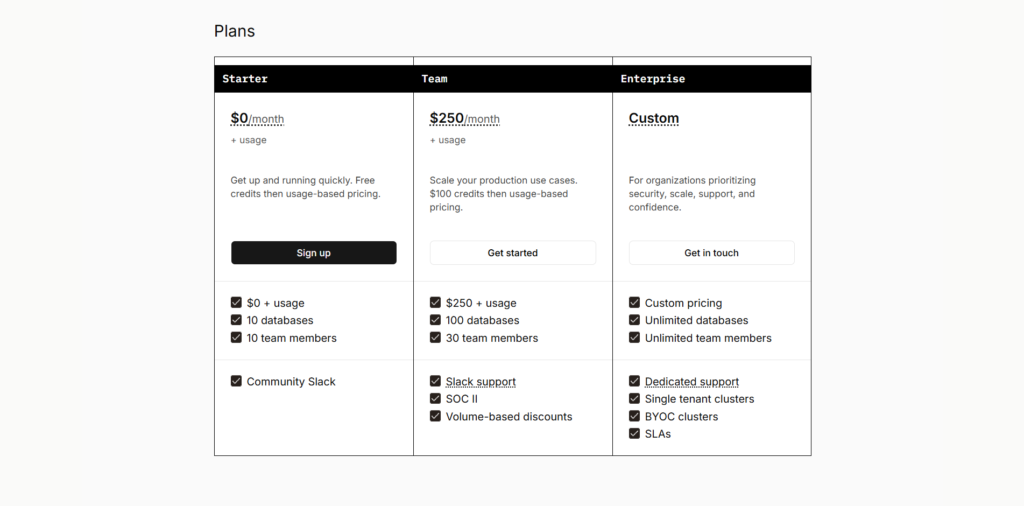
Chroma offers a free open-source version that you can run locally or self-host. For production use, there is Chroma Cloud, which operates on a freemium and usage-based model with serverless scaling.
There are signals of tiered pricing including free credits to get started, followed by paid cloud usage and likely enterprise plans for large-scale deployments. The product also hints at enterprise offerings such as private cloud deployment and advanced security features.
The pricing strategy clearly indicates a developer-first product-led growth model. The open-source core acts as the entry point, while cloud and enterprise offerings monetize scale, convenience, and operational simplicity.
This is typical for infrastructure tools: adoption is driven by open-source usage, while revenue comes from managed deployment and enterprise requirements.
Chroma is best suited for developers building AI systems that require retrieval, search, or RAG pipelines. It is not a consumer-facing tool but rather an infrastructure layer that powers AI applications behind the scenes.
Its biggest strength is the unification of multiple retrieval methods into a single system. Instead of stitching together separate tools for vector search, keyword search, and filtering, you get a single composable interface.
The main limitation is the learning curve. You need to understand embeddings and retrieval concepts to fully use it effectively, and it is not designed for non-technical users.
Overall, it stands out as a serious infrastructure tool rather than a polished SaaS product, and that distinction defines its entire user experience.

The Technology newsletter is a weekly digest of tech reviews, columns and headlines from Media Editor Mariebeth De Leus and RoadMap Founder Hoofar Pourzand.
Write to Hoofar at hpourzand@tryroadmap.com or Follow him here.